Tasks and calendar
Your tasks in Google Calendar – whatever tool they come from
Todowa puts your tasks where you already plan your day: in your calendar. Via Google Tasks they appear right in Google Calendar, and via the calendar feed in Apple Calendar and Outlook, too.
Freeno credit carddata in Frankfurtdelete anytime
Start for free – add Pro anytime
Three ways into Google Calendar
The first way is via Google Tasks. Todowa syncs tasks with your Google Tasks lists, and Google shows tasks with a date in Google Calendar. Check off a task there and it’s also done in Todowa and every connected tool.
The second way is connecting Google Calendar itself. Todowa creates a calendar entry for every task with a due date: a time block if it has a time, an all-day entry if it doesn’t. Move the entry in your calendar and the task’s due date changes; your other events stay untouched.
The third way is the calendar feed. Todowa publishes your tasks with due dates as a calendar you can subscribe to in Google Calendar, Apple Calendar or Outlook. This option is read-only, but doesn’t need a Google account.
- Google Tasks: title, notes, date and completion status, both ways
- Google Calendar: tasks with a time as events with start and duration, without a time as all-day entries – both ways
- Calendar feed: every task with a due date, in any calendar app
Create Google Calendar events straight from Todowa
With Google Calendar connected you no longer need to switch to Google’s app for an event. Select a time range in Todowa’s calendar and switch the window from “Task” to “Event”. Enter title, time or all-day, location and description, and pick from every calendar you can write to – shared team calendars included.
The event is in Google right away and shows up in Todowa’s calendar and in “Next 24 hours”. Move events from Google in Todowa’s calendar with the mouse or drag the edge to change the duration. In the detail view, “Edit” changes title, time, location and description – or delete the event.
Connect a Notion database to Google Calendar
Tasks with a due date belong in the calendar you open every day anyway – even if you manage them in a Notion database.
With Todowa you connect your Notion database and Google Tasks. A row with a due date in Notion becomes a task in Google Calendar; move the date in Notion and it moves in the calendar, too. The same goes for tasks from Asana and Todoist.
Timeblocking: plan tasks as time blocks
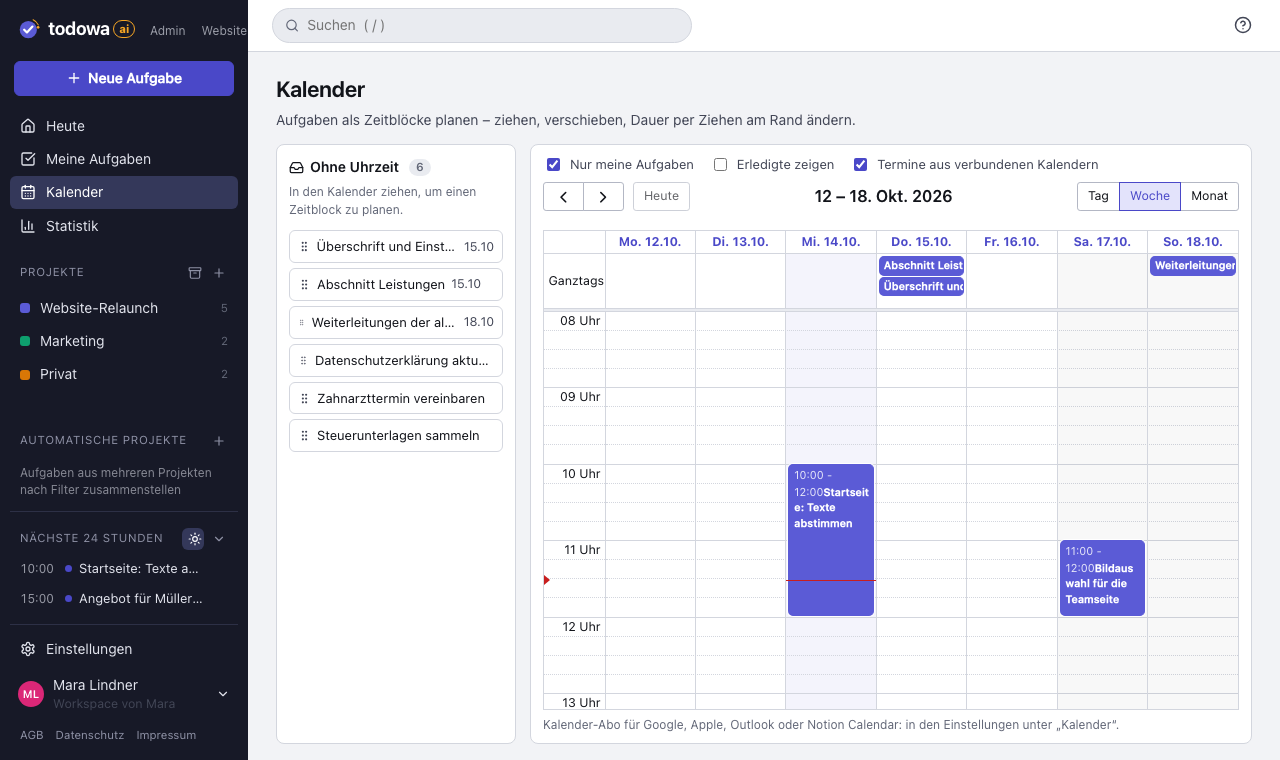
In Todowa’s weekly calendar you drag and drop tasks onto a time slot and set how long they’ll take. Your events from Google, Apple or Outlook sit alongside, so you only plan where there’s really time. Click an event to see its location, description and video call link – and to jump to the day view.
That turns your to-do list into a weekly plan: you see not only what’s coming up, but also whether it fits into your week.
Why we’re building Todowa
Your tasks belong to you – not to your tools.
Tasks are spread across many tools, and none of them sees the whole picture. We’re building Todowa as an AI-first to-do system that fits into the ones you already use: tasks show up in your Notion database, in Asana, in Todoist and in Google Calendar, and AI matches up what belongs together.
Our goal for TodowaFrequently asked questions
Can I show Todoist tasks in Google Calendar?
Yes. Connect Todoist and Google Tasks to Todowa. Tasks with a date then appear in Google Calendar and stay up to date in both directions.
Are times synced too?
Yes, through the Google Calendar connection: tasks with a time appear there as events with start and duration, tasks without a time as all-day entries, and moving an event changes the task’s due date. The Google Tasks API only supports a date, so there the task appears on the right day.
Can I see my calendar events in Todowa?
Yes. Add calendars from Google, Apple or Outlook via their subscription URL. The events appear in the weekly calendar next to your tasks.
More about Todowa
Bring your tasks together.
Create an account, connect your tools, get going – free, add Pro anytime.
Freeno credit carddata in Frankfurtdelete anytime